
Email and UKG system integration – 2026
Hello everyone,
As part of the Bridges / COARC integration, Bridges staff will be moving to the new arccs.org Microsoft account structure. We want to keep this as simple as possible. The most important thing to know is that your login for your computer and Microsoft products will become:
Example Username : (K)aren (Amanna) = kamanna
Complete Login : kamanna@arccs.org
This includes Outlook, Word, Excel, Teams, OneDrive, SharePoint, and other Microsoft 365 applications.
Here is what you can expect:
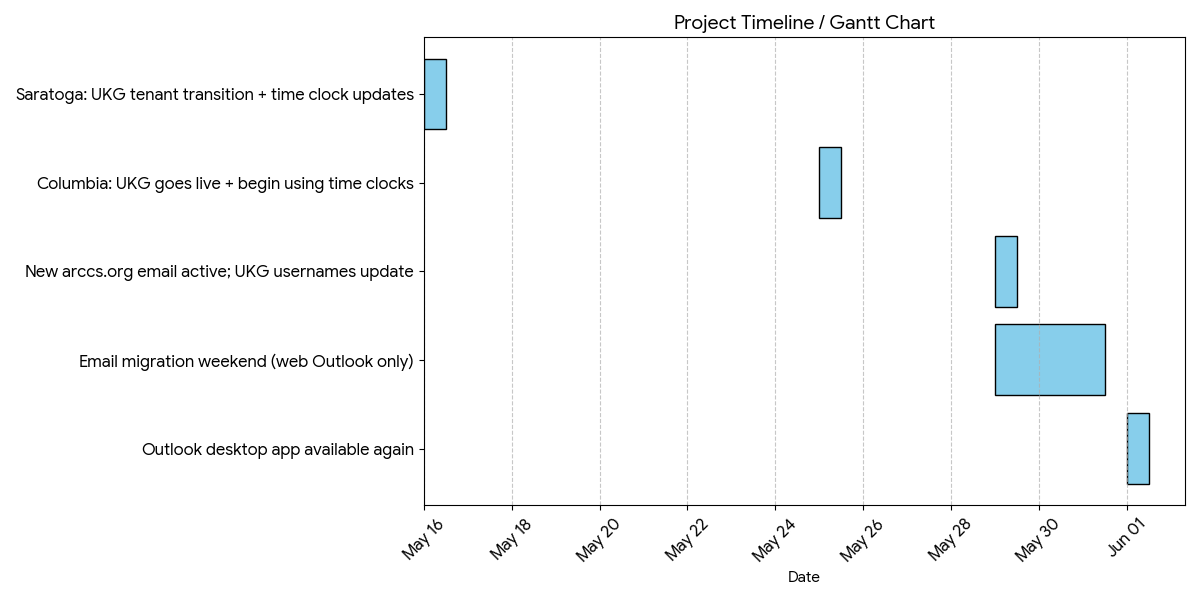
| EMAIL MIGRATION May 29–31
What changes · Your new address: <First Initial Last Name>@arccs.org · Old email will still receive messages During the weekend · Use Outlook on the web · Sign in with your new email + new authentication method Back to normal · Outlook desktop app returns Mon, June 1 |
UKG MIGRATION Site-specific dates
Saratoga (already on UKG) — May 16 · Move to the new UKG tenant · Sign in and change your password May 16 · Change password again May 29 (new email active) · Time clocks updated May 16 (brief downtime possible) Columbia (new to UKG) — May 25 · UKG goes live May 25 · Sign in with your email and set a password · May 29: username switches to your arccs.org email — reset UKG password · Time clocks start collecting punches May 25 |
This is the schedule we will follow to make these changes:
What to Do Before Leaving on Friday, May 29
Before leaving work on Friday, May 29, please log out of Microsoft applications, including:
- Outlook
- Word
- Excel
- Teams
- OneDrive
- Any other Microsoft 365 applications
Email Access During the Weekend
During the weekend of May 29, please use the Microsoft web portal to access email.
Email will continue to flow during the transition, and nothing should be lost.
What to Expect on Monday
Beginning Monday after the cutover, you may begin using your desktop and phone applications again with your new login: First Initial – Last Name!
e.g. : kamanna@arccs.org
Some applications may ask you to sign in again. This is expected.
You may also need to reconnect:
- Outlook
- OneDrive
- Teams
- Word or Excel
- Your phone email app
If something does not look right, it may simply need to be reconnected.
UKG and MFA
UKG access is also part of this transition. Staff may need to complete multi-factor authentication, also known as MFA.
If you are asked to set up MFA, please follow the instructions provided during training or by IT/HR.
For staff who do not have smartphones, an approved option will be provided. Please do not share phones, share codes, or ask another person to log in for you.
If You Have a Problem
If Outlook does not work, use the Microsoft web portal for email access.
If you have trouble logging in, using MFA, accessing UKG, or opening Microsoft applications, please contact IT through the normal support process and notify your supervisor if the issue affects your ability to work.
Thank you for your patience and cooperation during this transition.
Quick Reference
|
Situation |
What to Do |
|
Before leaving Friday, May 29 |
Log out of Outlook, Word, Excel, Teams, OneDrive, and Microsoft 365 apps. |
|
Weekend of May 29 |
Use the Microsoft web portal for email. |
|
Monday after cutover |
Use user@arccs.org for your computer and Microsoft products. |
|
Outlook does not work |
Use the Microsoft web portal and contact IT. |
|
MFA or UKG problem |
Follow training instructions and contact IT/HR through the normal support process. |